CREDIT NOTES
Credit Notes are typically added to an invoice to reflect any changes, such as refunds, offers, or promotions.
A credit note is issued in scenarios where an invoice needs to be adjusted, such as when a product was missed, an overcharge occurred, or a promotion or refund needs to be applied.
If any of these situations arise, a credit note is created, and the corresponding amount is deducted from the next month's invoice. This ensures that the adjustments are properly reflected in the billing process.
Distributors can create credit notes for both partners and customers, while partners can only create credit notes for their customers. Once a credit note is issued, it is automatically applied to the following month's invoice.
Note
When creating a credit note, we need to provide the product name, ID, and quantity. In the invoice, a negative entry will be updated, but for the associated customer or partner, we only display the credit note details without reducing the price in the line item or billing transactions for that product.
Purpose of Credit Notes:
Correction of Errors: If an invoice was issued incorrectly, a credit note can correct the amount due.
Returns and Refunds: If a customer returns goods, a credit note can document the reduction in the amount due.
Discounts and Promotions: A credit note can apply discounts or promotional adjustments after an invoice has been issued.
Navigate to the Distributor Credit Notes:
Login to Distributor Tenant -> Profile -> My Account -> Billing -> Credit Notes -> Create
Select Partner: This dropdown allows the distributor to select a partner for whom the credit note will be created.
Select Customer: This field enables the distributor to choose the specific customer associated with the selected partner for whom the credit note is applicable.
Select Partner Subscription: Once a partner is selected, this dropdown field allows the distributor to select the relevant subscription associated with the partner.
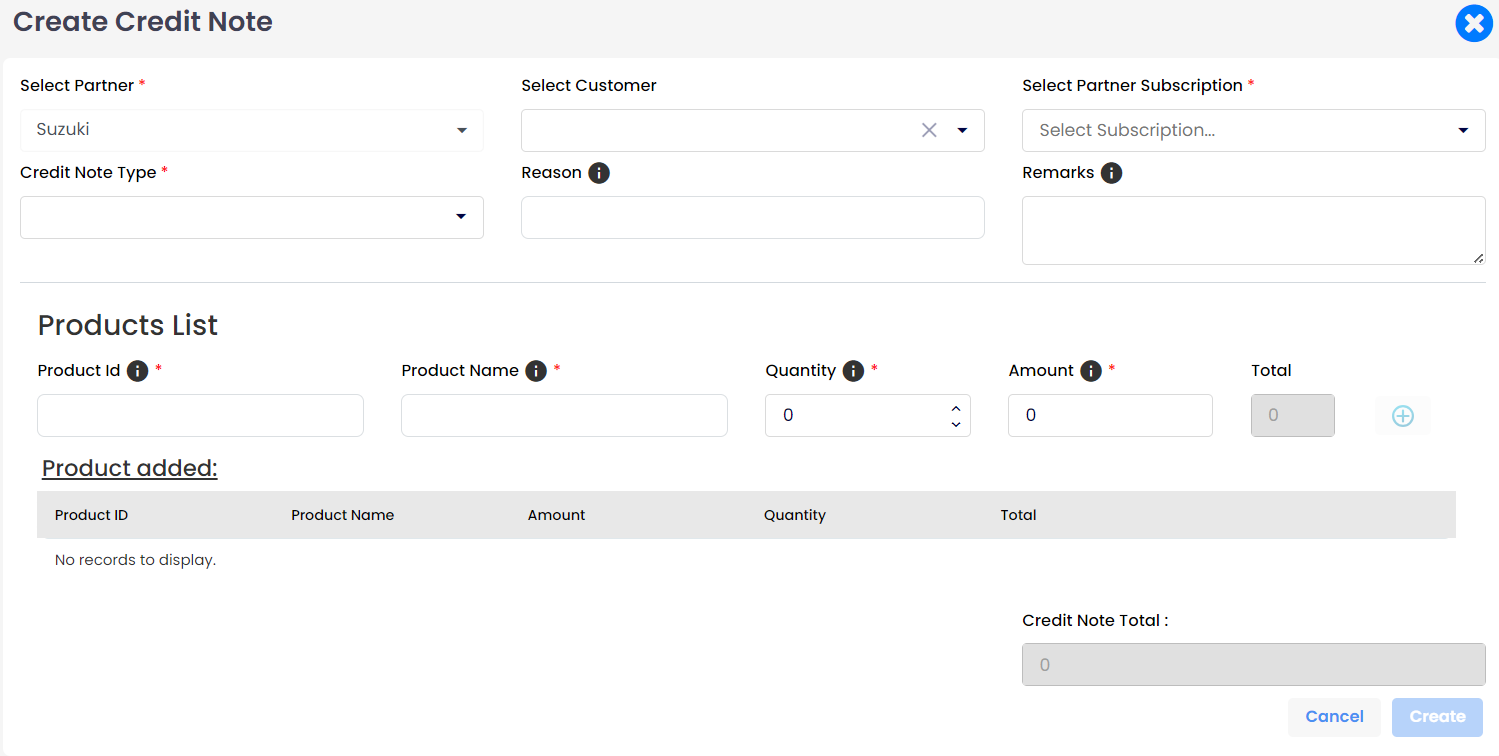
Navigate to the Partner Credit Notes:
Login to Partner Tenant -> Profile -> My Account -> Billing -> Credit Notes -> Create
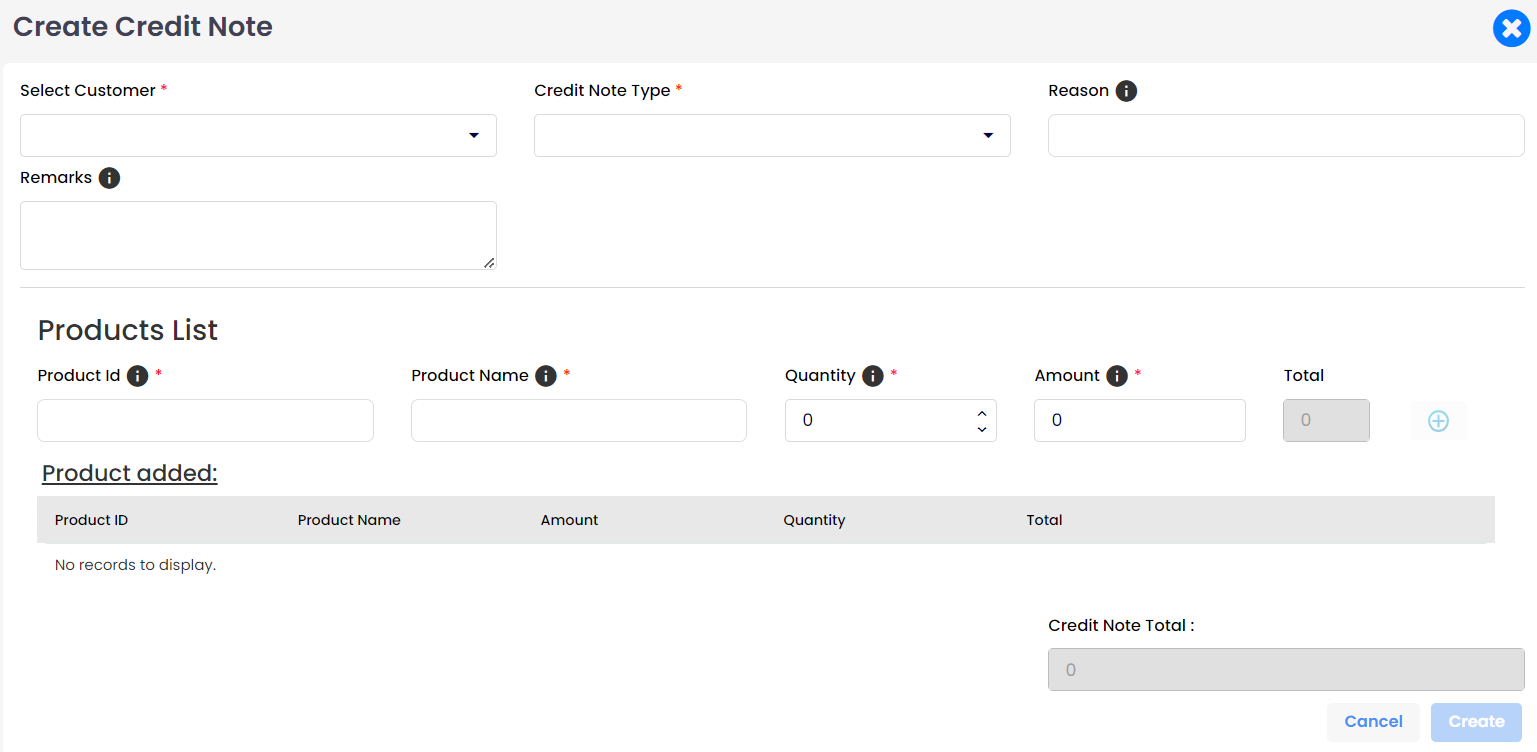
- Select Customer:
This dropdown allows the user to select the customer for whom the credit note is being created.
Usage: It is Required to associate the credit note with a specific customer.
- Select Customer Type:
Once the customer is selected, it allows the user to select the customer subscription from the dropdown list.
- Credit Note Type:
This field specifies the type of credit note being issued.
Usage: Required to categorize the credit note appropriately, such as for a refund, promotion, and others.
- Refund: Issued when a refund is being processed for the partner and customer.
- Promotion: Issued as part of a promotional offer for the product.
- Other: Issued for reasons not covered by the standard categories, such as adjustments or special cases.
- Reason:
Enter the reason for issuing the credit note.
Usage: Important for documentation and tracking purposes, explaining why the credit note is being issued.
- Remarks:
A text area to enter any additional comments or remarks about the credit note.
Usage: Optional but useful for adding extra details or context that are not covered by the predefined fields.
- Product Id:
A field to enter the ID of the product for which the credit note is being created.
Usage: Essential for identifying the specific product related to the credit note.
- Product Name:
A field to enter the name of the product.
Usage: Required for clear identification and reference of the product in question.
- Quantity:
A field to specify the quantity of the product associated with the credit note.
Usage: Necessary for calculating the total amount of the credit note based on the quantity.
- Amount:
A field to enter the amount per unit of the product.
Usage: Used to calculate the total credit amount by multiplying with the quantity.
- Total:
This field automatically calculates the total amount based on the quantity and unit price.
Usage: Provides the total credit amount for the product line item.
- Products Added:
This section lists the multiple products that have been added to the credit note along with their details.
Usage: Allows the user to review and verify the products and amounts before finalizing the credit note.
- Credit Note Total:
Displays the total amount of the credit note.
Usage: Shows the cumulative total of all the product line items added to the credit note.
- Cancel Button:
A button to cancel the creation of the credit note.
Usage: Discards the current entries and exits the credit note creation process.
- Create Button:
A button to finalize and create the credit note.
Usage: Saves the credit note with the entered details and applies it to the customer�s account.
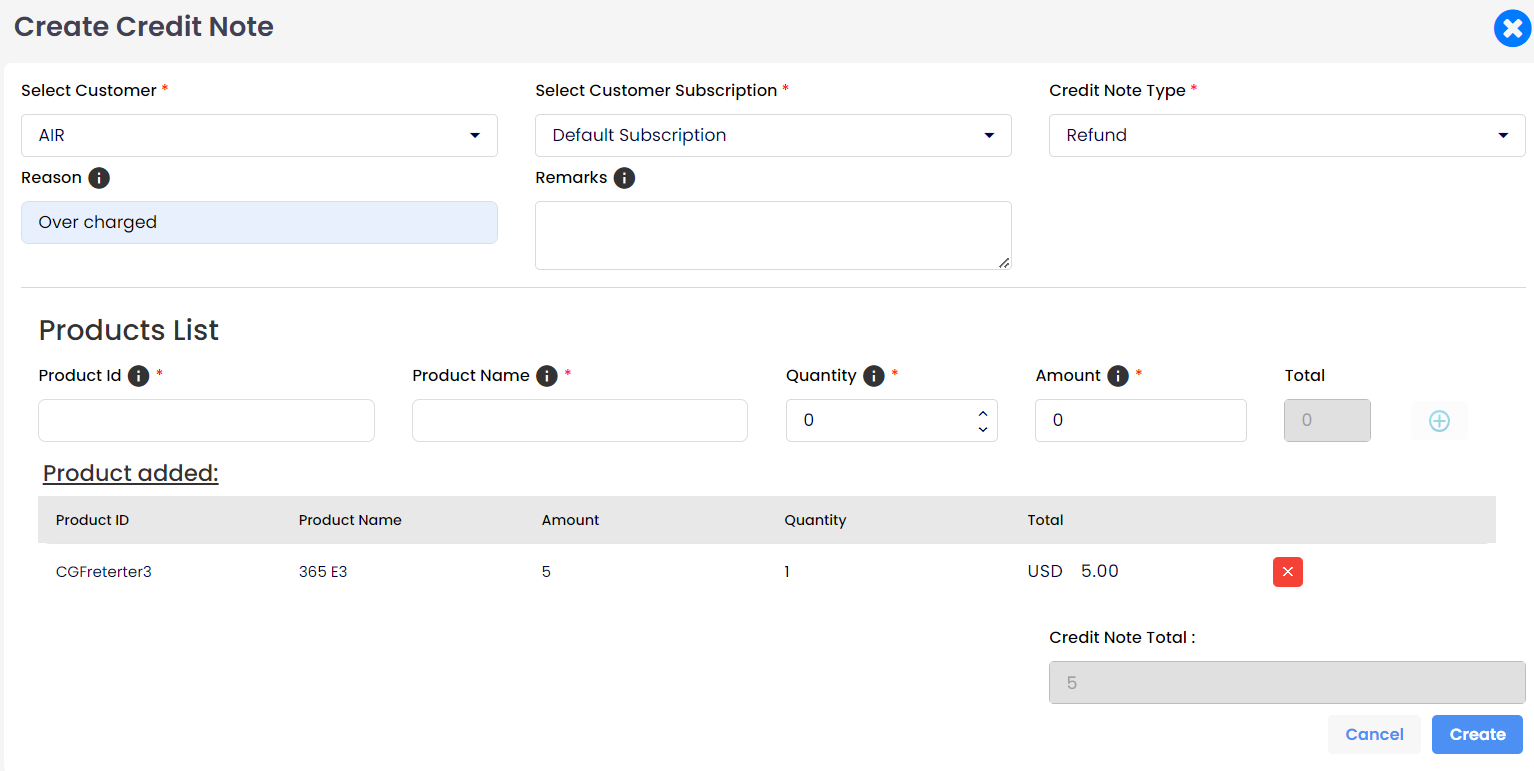
When a partner creates a credit note, it will be applied to the customer's invoice in the following month. The credit note details will appear in a dedicated table within the invoice, showing the credited amount and the reason. This ensures accurate billing adjustments for overcharges, refunds, or promotions, providing transparency and clarity for both the partner and the customer.
